

dataModelId is the ID of the data model you are using.
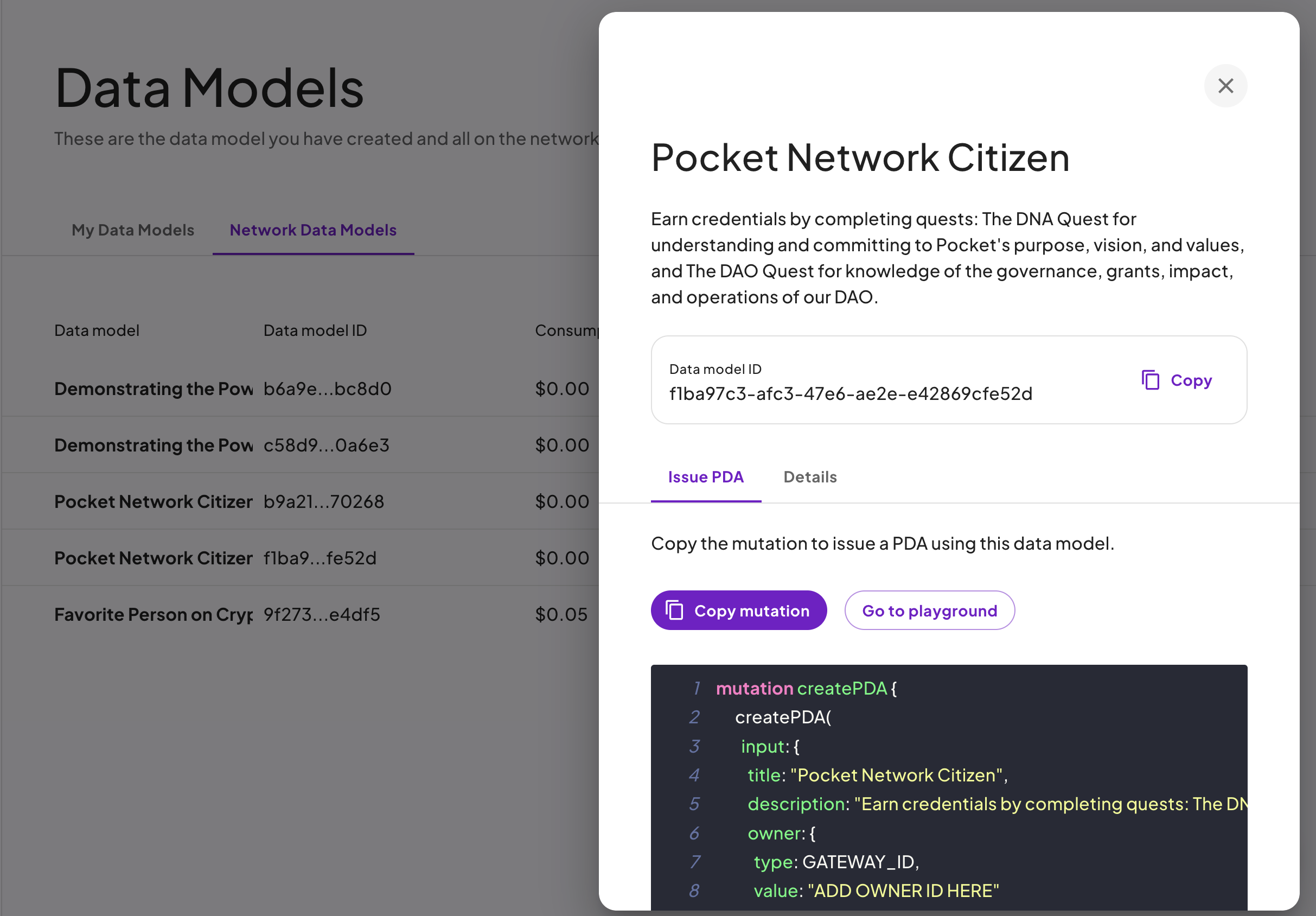
You can fetch an already prepared query from the dashboard for the data model you are using.
Documentation Index
Fetch the complete documentation index at: /llms.txt
Use this file to discover all available pages before exploring further.
const axios = require("axios");
let data = JSON.stringify({
  query: `YOUR_GRAPHQL_QUERY_HERE`,
  variables: {},
});

let config = {
  method: "post",
  maxBodyLength: Infinity,
  url: "https://sandbox.protocol.mygateway.xyz/graphql",
  headers: {
    "X-Api-Key": "<YOUR_API_KEY>",
    Authorization: "Bearer <YOUR_AUTHENTICATION_TOKEN>",
    "Content-Type": "application/json",
  },
  data: data,
};

axios
  .request(config)
  .then((response) => {
    console.log(JSON.stringify(response.data));
  })
  .catch((error) => {
    console.log(error);
  });
{
  "data": {
    "createPDA": {
      "id": "69786e9a-52c9-42ec-945f-c5b4987d0b3b",
      "arweaveUrl": "https://arweave.net/rprGIebHqyxuIRVQaCYTGrrQg2k4Io8vXP7kNOOZC68",
      "dataAsset": {
        "owner": {
          "id": "dffb7a18-d2a4-472e-ac46-4f069b1e8ead",
          "gatewayId": "saviour1001"
        },
        "issuer": {
          "id": "dffb7a18-d2a4-472e-ac46-4f069b1e8ead",
          "gatewayId": "saviour1001"
        }
      }
    }
  }
}
const axios = require("axios");
let data = JSON.stringify({
  query: `YOUR_GRAPHQL_QUERY_HERE`,
  variables: {},
});

let config = {
  method: "post",
  maxBodyLength: Infinity,
  url: "https://sandbox.protocol.mygateway.xyz/graphql",
  headers: {
    "X-Api-Key": "<YOUR_API_KEY>",
    Authorization: "Bearer <YOUR_AUTHENTICATION_TOKEN>",
    "Content-Type": "application/json",
  },
  data: data,
};

axios
  .request(config)
  .then((response) => {
    console.log(JSON.stringify(response.data));
  })
  .catch((error) => {
    console.log(error);
  });
{
  "data": {
    "createPDA": {
      "id": "69786e9a-52c9-42ec-945f-c5b4987d0b3b",
      "arweaveUrl": "https://arweave.net/rprGIebHqyxuIRVQaCYTGrrQg2k4Io8vXP7kNOOZC68",
      "dataAsset": {
        "owner": {
          "id": "dffb7a18-d2a4-472e-ac46-4f069b1e8ead",
          "gatewayId": "saviour1001"
        },
        "issuer": {
          "id": "dffb7a18-d2a4-472e-ac46-4f069b1e8ead",
          "gatewayId": "saviour1001"
        }
      }
    }
  }
}
# Query
mutation createPDA {
  createPDA(
    input: {
      title: "Favorite Person on Crypto Twitter"
      description: "This is to someone who's content you admire/love on Crypto Twitter."
      owner: { type: GATEWAY_ID, value: "saviour1001" } # Whomst the PDA is issued to
      dataModelId: "9f27397e-27f2-4c30-b1b7-829371de4df5" # The data model ID for the PDA
      expirationDate: null
      organization: null
      claim: {
        handleName: "@gateway_xyz" # string
        favoritePosts: ["awesome"] # array
      }
    }
  ) {
    id
    arweaveUrl
    dataAsset {
      owner {
        id
        gatewayId
      }
      issuer {
        id
        gatewayId
      }
    }
  }
}
dataModelId is the ID of the data model you are using.
You can fetch an already prepared query from the dashboard for the data model you are using.
const axios = require("axios");
let data = JSON.stringify({
  query: `YOUR_GRAPHQL_QUERY_HERE`,
  variables: {},
});

let config = {
  method: "post",
  maxBodyLength: Infinity,
  url: "https://sandbox.protocol.mygateway.xyz/graphql",
  headers: {
    "X-Api-Key": "<YOUR_API_KEY>",
    Authorization: "Bearer <YOUR_AUTHENTICATION_TOKEN>",
    "Content-Type": "application/json",
  },
  data: data,
};

axios
  .request(config)
  .then((response) => {
    console.log(JSON.stringify(response.data));
  })
  .catch((error) => {
    console.log(error);
  });
{
  "data": {
    "createPDA": {
      "id": "69786e9a-52c9-42ec-945f-c5b4987d0b3b",
      "arweaveUrl": "https://arweave.net/rprGIebHqyxuIRVQaCYTGrrQg2k4Io8vXP7kNOOZC68",
      "dataAsset": {
        "owner": {
          "id": "dffb7a18-d2a4-472e-ac46-4f069b1e8ead",
          "gatewayId": "saviour1001"
        },
        "issuer": {
          "id": "dffb7a18-d2a4-472e-ac46-4f069b1e8ead",
          "gatewayId": "saviour1001"
        }
      }
    }
  }
}